Google PM Application Strategy: Resume, Role Fit, and Referral Guide
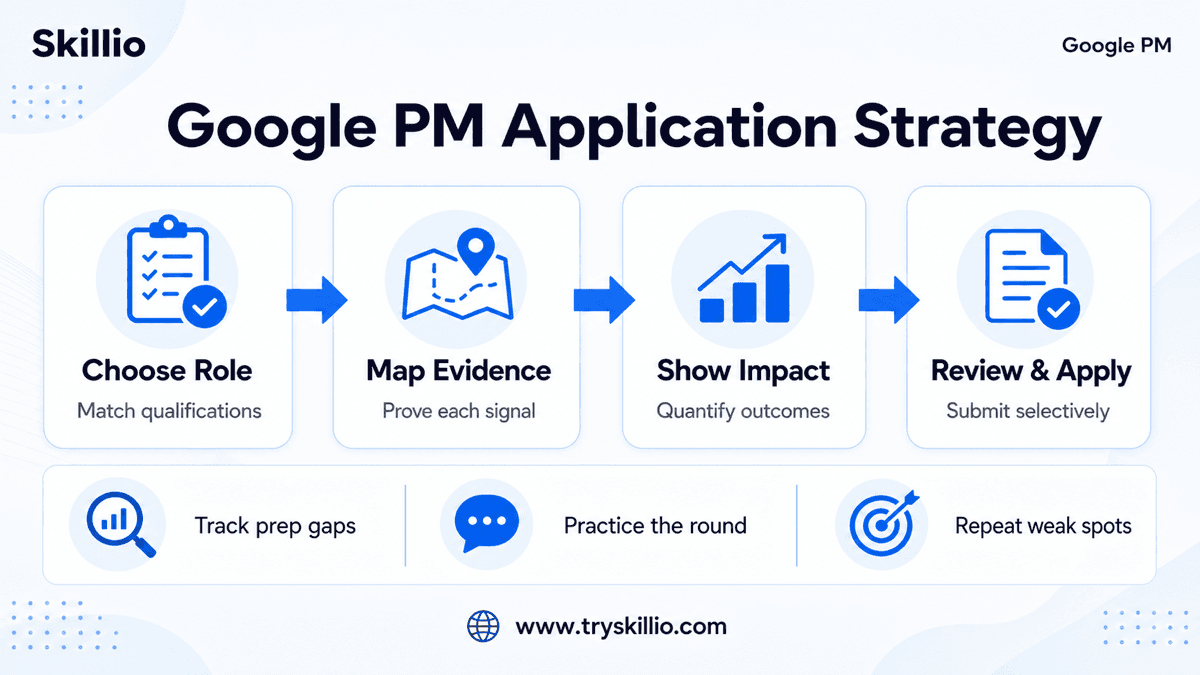
A strong Google PM application is not a high-volume exercise. It is a role-matching exercise: choose positions where your experience clearly meets the qualifications, make the evidence easy to find, and show the product scope and outcomes you personally drove.
Google Careers currently allows candidates to apply to up to three jobs in a rolling 30-day window and explicitly recommends focusing on the roles that best match their talents. That makes selectivity part of the application strategy—not something to consider after submitting.
This guide shows how to choose a Google Product Manager role, map your experience to the posting, strengthen your resume, think about referrals, and complete a focused final review.
Google PM Application Strategy at a Glance
| Step | Decision | Strong Output |
|---|---|---|
| Choose the role | Does your evidence match the actual qualifications and product scope? | One or two high-fit roles, not a list based only on title |
| Map the requirements | Where does your resume prove each important requirement? | A qualification-to-evidence table |
| Build the PM narrative | What did you own, decide, launch, and improve? | A clear product through-line across roles |
| Rewrite the resume | Can a reviewer see scope, action, and outcome quickly? | Concise, measurable, role-relevant bullets |
| Add context | Does a referral or recruiter connection add accurate context? | A specific, truthful explanation of fit |
| Review and submit | Is every field and document final? | A complete application you can stand behind |
Step 1: Choose the Right Google PM Roles
Start with the job description, not with the Google name. Two Product Manager roles at Google can have the same title while requiring very different evidence. A Search or AI role may emphasize model evaluation, prototyping, and user trust. A Cloud role may place more weight on enterprise platforms and go-to-market work. An Ads role may require ecosystem, policy, marketplace, or monetization experience.
Read three parts of the posting separately:
- Minimum qualifications: Treat these as the first evidence gate. If you cannot point to credible experience for a material requirement, the role may not be the best use of one of your limited applications.
- Preferred qualifications: Use these to distinguish between roles that all look plausible. You do not need to match every preferred item, but the pattern shows what the team values.
- Responsibilities and about-the-job section: These reveal the actual product problem, partner functions, users, and expected scope.
Use a simple fit scorecard
| Area | Question | Evidence to Look For |
|---|---|---|
| Product lifecycle | Have you taken a product or major capability from problem definition through launch and iteration? | Launches, adoption, quality, revenue, efficiency, or retention outcomes |
| Product domain | Have you worked on a similar user, market, platform, or technical problem? | Relevant product surfaces, customer types, or constraints |
| Technical depth | Can you work credibly with the engineering or data complexity named in the role? | Architecture decisions, ML/AI work, APIs, data systems, experiments, or platform tradeoffs |
| Cross-functional scope | Have you led work across the functions named in the posting? | Engineering, design, research, data, sales, finance, policy, or operations examples |
| Level and scale | Does your ownership match the role's expected level? | Team scope, roadmap horizon, stakeholder seniority, ambiguity, and business impact |
Apply where the evidence is visible and specific. A role can be aspirational without being random, but the resume still needs to show why the gap is bridgeable.
Step 2: Map Qualifications to Resume Evidence
Before rewriting your resume, create a private evidence table. Copy the important qualification or responsibility into the left column and write the strongest proof from your experience on the right.
| Role Requirement | Your Evidence | Resume Change Needed? |
|---|---|---|
| Took a technical product from conception to launch | Led discovery, roadmap, launch, and iteration for a workflow used by 80,000 customers | Move outcome into first bullet |
| Worked cross-functionally with engineering and UX | Led a six-person product trio plus data and operations partners | Name functions and decision scope |
| Used data to guide product strategy | Diagnosed activation loss and changed onboarding priorities | Add baseline, action, and result |
| Domain experience | Owned an ML-assisted support product | Make model-quality and trust tradeoffs explicit |
This exercise prevents two common mistakes: adding keywords with no proof and burying the best evidence in a low-priority bullet.
If the posting emphasizes something you have done but your resume does not show it, fix the resume. If it emphasizes something you have not done, do not manufacture a match.
Step 3: Build a Clear Google PM Narrative
A recruiter should not have to reconstruct your PM story from disconnected responsibilities. Across the top half of the resume, make four things clear:
- What product or problem you owned. Name the user, product surface, or business problem in plain language.
- What decision was yours. Show prioritization, strategy, requirements, experiment design, or launch ownership.
- Who you led or influenced. Name the relevant cross-functional partners and the complexity of alignment.
- What changed. Use a measurable user, product, business, quality, speed, or operational result.
The strongest narrative is not “I did everything.” It is “I made important product decisions, worked through real constraints, and created a result.”
Step 4: Write Evidence-Led Resume Bullets
Google's published resume guidance emphasizes being concise, relevant, and achievement-focused. For PM roles, a useful bullet often follows this shape:
Outcome + product decision + scope or method + evidence
Weak:
Managed the roadmap and worked with engineering and design on onboarding improvements.
Stronger:
Increased new-user activation by 14% by prioritizing a guided onboarding flow, aligning engineering and design on a six-week MVP, and validating the change through a controlled experiment.
The stronger version shows the result, the product choice, the collaboration, and the method. It also gives an interviewer several useful follow-up paths.
What to quantify
Quantification is not limited to revenue. Depending on the product, useful evidence can include:
- Adoption, activation, retention, or engagement
- Quality, reliability, latency, safety, or error reduction
- Revenue, margin, conversion, cost, or operational efficiency
- Time saved, launch speed, or process improvement
- Number and type of users, customers, markets, teams, or systems affected
- Experiment result or confidence gained from research
Do not force a vanity metric into every bullet. The number should help the reviewer understand the scale or result.
Step 5: Show Google-Relevant PM Signals
Current Google PM postings vary, but several signals appear repeatedly.
End-to-end product ownership
Show more than delivery. Include how you identified the problem, chose a direction, defined success, launched, and changed course based on evidence.
Technical and analytical fluency
You do not need to present yourself as the engineer. Show that you can make product decisions with technical constraints, ask the right questions, and work closely with engineering and data partners.
User and business judgment
Connect the user's problem to the product and business decision. Avoid bullets that show activity but no reason for the work.
Cross-functional leadership
Product leadership usually operates without formal authority. Show how you created clarity, resolved disagreement, or aligned teams around a tradeoff.
Adaptability and scope
Google postings frequently describe changing user needs and complex problems. Show decisions made under uncertainty, not only clean projects with predictable outcomes.
How to Think About Google Referrals
A referral can provide context about your work and fit, but it does not replace the application or the qualifications. Google does not publicly promise that a referral guarantees an interview, a recruiter review, or a faster outcome.
If you ask someone for a referral, make the request easy to evaluate:
- Share the exact role link.
- Explain in two or three sentences why your experience fits it.
- Attach the final resume you plan to submit.
- Give the person room to decline.
- Do not ask someone who barely knows your work to make claims they cannot support.
A specific referral from someone who understands your work is more credible than a generic connection. If you do not have one, submit a strong direct application rather than waiting indefinitely.
Complete the Google Careers Application Carefully
Google Careers requires a Careers Profile. The official application guidance says your resume must be no larger than 2 MB, and the education, work history, and cover-letter fields are optional. It also warns that you can change an application before submitting but cannot edit the submitted application or its documents afterward.
Before you submit:
- Confirm you are using the intended Google account and email.
- Upload the correct final resume.
- Review parsed fields because automated resume parsing can be incomplete.
- Check location, work authorization, and contact details.
- Read the qualifications one final time.
- Save a copy of the role description and submitted resume for interview preparation.
Selective applications also make later preparation easier: your resume story, target role, and interview examples already point in the same direction.
A 30-Minute Final Application Review
| Time | Review |
|---|---|
| 5 minutes | Re-read minimum and preferred qualifications. |
| 8 minutes | Confirm every important requirement has visible evidence. |
| 7 minutes | Tighten the first two bullets for each recent role. |
| 5 minutes | Verify dates, metrics, links, file size, and contact details. |
| 5 minutes | Review the submitted fields and role-specific questions. |
Once submitted, shift your effort to the next likely step. Review the Google PM interview process, organize your Google PM interview questions, and practice explaining the same evidence you used in the application.
Common Google PM Application Mistakes
- Applying to three loosely related roles because the titles look similar.
- Repeating job-description phrases without showing evidence.
- Listing responsibilities instead of product decisions and outcomes.
- Hiding relevant technical or cross-functional work behind internal terminology.
- Claiming ownership that will not survive interview follow-up.
- Waiting for a referral instead of submitting a strong, time-sensitive application.
- Uploading a generic resume and assuming the recruiter will infer role fit.
- Submitting before checking the parsed application fields.
Google PM Application FAQs
How many Google jobs can I apply to?
Google Careers currently says candidates can apply to up to three jobs in a rolling 30-day window. The same guidance recommends focusing on the roles that best match your background.
Should I tailor my resume for each Google PM role?
Yes. Tailoring should mean selecting and clarifying truthful evidence that matches the role—not copying keywords or inventing experience. Different Google PM teams can emphasize very different domains and partner functions.
Do I need a cover letter for a Google application?
Google Careers currently lists the cover letter as optional. If you include one, use it to explain a material fit point the resume cannot show clearly. Do not repeat the resume.
Does a Google referral guarantee an interview?
No public Google source guarantees that a referral will produce an interview. Treat a referral as credible context that can support a strong application, not as a substitute for qualifications.
What should a Google PM resume emphasize?
Emphasize product ownership, measurable impact, user and business judgment, technical fluency, cross-functional leadership, and evidence that matches the selected role's qualifications.
Can I edit my Google application after submitting?
Google Careers says you can edit an application before submission, but you cannot change the submitted application or its attached documents afterward. Review everything carefully before submitting.